 Archive A Reconstructed © MegaSecurity Database
RAIM 1.0 (a)
Released 22 years, 5 months ago. May 2004
Copyright © MegaSecurity
By SNiiPeR
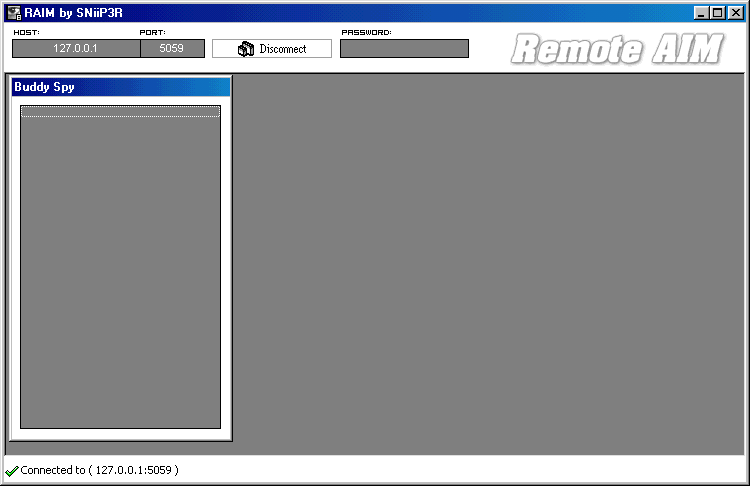
Informations
| Author | SNiiPeR |
| Family | AimRat |
| Category | Remote Access |
| Version | RAIM 1.0 (a) |
| Released Date | May 2004, 22 years, 5 months ago. |
| Language | Visual Basic |
Additional Information
Server:
port: 4159, 4160, 5059 TCP

startup:
HKEY_LOCAL_MACHINE\SOFTWARE\Microsoft\Windows\CurrentVersion\Run "server.exe"

tested on Windows XP
November 17, 2004
Author Information / Description
How to use ?
-------------

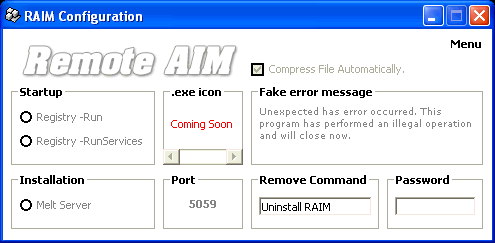
	1) Open RAIM Server Creator.exe and configure your server.
                  When you are done , go to Menu ( top right corner ) and select "Build .exe"
	    Save the file BUT DO NOT OPEN IT !!!

Configuration ( RAIM Server Creator )
---------------

              1) [ Startup Methods ]
                  Registry Run - I recommend using this one. Since most users use WinXP now.
                  Registry RunServices - This one does not work with XP. ( Win 95 / 98 / ME )

              2) [ Installation ]
                  Melt Server - This options clones your server on victims machine.
                  When the server is open it creates a clone and hides itself. This way the user
                  can simply delete the server you sent them not knowing that the clone was installed.

              3) [ .exe icon ]
                  I had to remove this option, it was causing problems. Will be fixed though.

              4) [ Port ]
                  Thats the port that Raim client is using to connect to server.

              5) [ Fake error message ]
                  When the server is executed the error will pop up showing that message.
                  You can use your own text.

              6) [ Remove Command ]
                  I suggest not to use default command, change it. So no one would be
                  able to remove the server.

              7) [ Password ]
                  Add a password protection to your server , so only you could connect to remote
                  computer.


Commands
-------------

              Note: User wont see any of these commands you send !

	1) To recieve user's IP address, send an IM using this command.

              can I please have your external IP address.

              2) To remove the server use the remove command that you added to your server
              default one is : Uninstall RAIM , but it's not going to work if changed it.

              3) To check if your server works, send this command via IM

              ****

              If you get an answer like, SNiiP3R says Hi =) then it works

SNiiPeR
This archive is an almost-complete reconstruction of the legendary Mega Security (also known as Kobayashi), a premier 90s-era "Trojan Database" where malware authors once showcased their work. After a decade offline, the site was brought back in August 2024 by its original creator, MasterRat, who authorized me to host this modernized, searchable version of the collection. While the original site remains available for those seeking a nostalgic, old-school experience, we are proud to continue its legacy here. Full credit and thanks go to MasterRat and the retired Mega Security staff for their years of dedicated work in cataloging these historical samples.