 Archive A Reconstructed © MegaSecurity Database
XPloit 1.0
Released 20 years, 7 months ago. March 2006
Copyright © MegaSecurity
By My-Self
Informations
| From | Germany |
| Author | My-Self |
| Family | XPloit |
| Category | Remote Access |
| Version | XPloit 1.0 |
| Released Date | Mar 2006, 20 years, 7 months ago. |
Additional Information
Server:
dropped files:
c:\WINDOWS\system32\server.dll    Size: 105,472 bytes
c:\WINDOWS\system32\server.exe    Size: 121,492 bytes

startup:
HKEY_LOCAL_MACHINE\SOFTWARE\Microsoft\Windows\CurrentVersion\Run "Xploit Server"
data: C:\WINDOWS\system32\\server.exe


tested on Windows XP
March 19, 2006
Author Information / Description
1) Short Introduction

Xploit is an advanced remote adminstration tool, wich is able
to get trough the most hardware/software firewalls. You will be able to
completely control an unlimited number of connected computers, that you own.

2) Quick start

- Open the Client
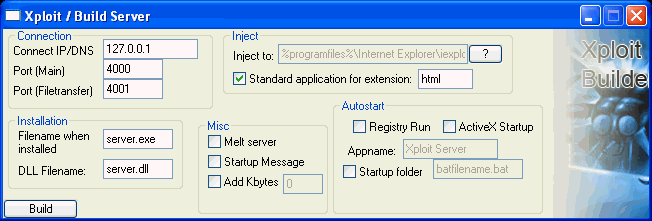
- Click create server
- Connect IP/DNS: Enter YOUR Ip or dns, for example 127.0.0.1 or lala.dyndns.org
- Filename when installed: make shure it ends with .exe or the Server wont work
- Port (Main): the Main-Port for the connection (Commands, directories..., change the Client port to this port or the 	       connection won't work)
- Port (Filetransfer): The port for Filetransfers
- Dll Filename: the .dll that includes the server Code, make shure it ends with .dll
- Injection: You can inject your code in a specified path or the standard application
	     for an extension (firewall bypass), for example "html", the server is injected to iexplore.exe
	     or firefox.exe
- Melt Server: Deletes the clicked server (not the installed one)
- startup message: lets you create a messagebox on startup of the server
- Add Kbytes: add a specific number of bytes at the end of the server.0
- click "Build"
- Once you createt the server, run it on the Computer you like to control
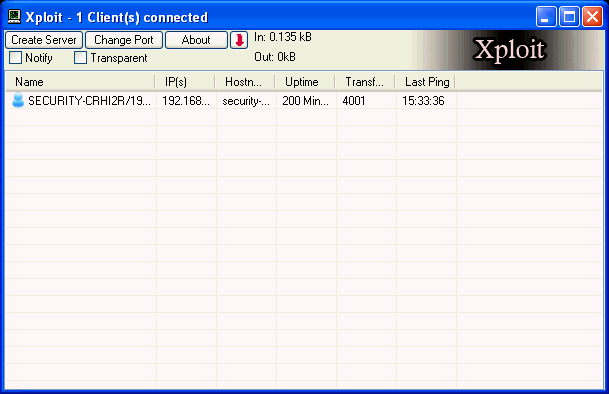
- a message should appear in Xploit and an list entry with the name, ip,... of the remote pc should appear.
- now you have full control over this computer, click right mouse to open the menu.
- finished :)

3) Features

Xploit has a lot of features, the most important here:

Xploit Features:

+ Server
- Reverse connection
- process injection
- Firewall bypass
- Registry/Run
- ActiveX Startup
+ Full Filemanager
+ Screencapture
- Simulate Keyboard
- Simulate Mouse
- Screenshots are Compressed with JPEG and JCalG1-Algorythm for extra-fast transfer
+ Process Manager
- Kill process
+ Administrator
- Disable Keyboard & Mouse
- Disable Taskmanager
- Disable Monitor
- Get & Set Clipboard text
+ Fun (Lame ;)
- Desktop-Paint
- Beep
- Open/Close CD-Tray
- Swap Mousebuttons
- Draw text on screen
- Send to URL
- Taskbar access (Open startmenu, minimize windows, ...)
+ Clientinfo
+ PC
- Shutdown
- Log off
- Restart
- Quickrestart (Computer restarts imediately)
+ Keylogger
+ Full Registry access
+ Chat
+ Remote Shell (Windows console)
+ Full Window manager
- Minimize, Maximize, Close, Kill Windows
- Block / Unblock Window Input
- Set Windowtitle
- Send keys to Windows


4) Version history

++++++ 1.0 ++++++
First release
This archive is an almost-complete reconstruction of the legendary Mega Security (also known as Kobayashi), a premier 90s-era "Trojan Database" where malware authors once showcased their work. After a decade offline, the site was brought back in August 2024 by its original creator, MasterRat, who authorized me to host this modernized, searchable version of the collection. While the original site remains available for those seeking a nostalgic, old-school experience, we are proud to continue its legacy here. Full credit and thanks go to MasterRat and the retired Mega Security staff for their years of dedicated work in cataloging these historical samples.