 Archive A Reconstructed © MegaSecurity Database
Winshell 4.0
Copyright © MegaSecurity
By Mr.Janker
Informations
| From | China |
| Author | Mr.Janker |
| Family | Winshell |
| Category | Remote Access |
| Version | Winshell 4.0 |
| Language | Visual C++ |
Additional Information
Server:
C:\windows\winshell.exe

size: 7 KB

port: 5277 TCP

restart:
HKLM\SOFTWARE\Microsoft\Windows\CurrentVersion\Run
Author Information / Description
WinShell V4.0 £ A small and power telnet server for windows
Author: janker
About
=====
WinShell was a telnet server for windows platform.
Main program was just a 6k bytes stand-alone executable file,
Could run stably without any third dll, Although it was so thin,
it had many of funtions, such as custom port, password protect,
muti-user logon, NT Service mode, download file£¬user-defined message,
special anti-ddos, etc. Detail to see the following:
1¡¢Support Windows 9x/me/nt/2k/xp
2¡¢Just a executable file, without setup
3¡¢Support all of standard telnet client
4¡¢Allow muti-user logon
5¡¢Custom port number
6¡¢Run in the background
7¡¢Support NT service mode
8¡¢Password protect
9¡¢Build-in install and uninstall
10¡¢Build-in file download
11¡¢Build-in reboot and poweroff
12¡¢Build-in terminate itself remotely
13¡¢Special anti-ddos flood
14¡¢No backdoor password
Release Files
=============
ws4maker.exe winshell make program
ws4maker.exe.sig Digital sign file
english.txt English help file
chinese.txt Chinese help file
janker.asc Author's public key file
Make WinShell
=============
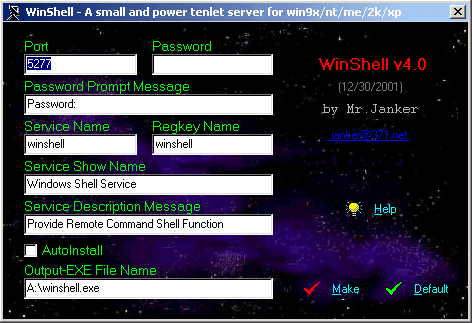
1. Run ws4maker.exe.
2. Config the options as you need.
3. Click the button "make".
4. Get your custom winshell.exe!
The main options detail as the following:
Port:
-----
The listening port number, default was 5277.
Password:
---------
The logon key, default was none.
Password Prompt Message:
------------------------
The asking input password message, default was "Password:".
Service Name:
-------------
NT Service name for system, default was "winshell".
Example: the service name of ms ftp server was "msftpsvc".
RegKey Name:
------------
The registry key name for autorun in the win9x/me, default was "winshell". example:
[HKEY_LOCAL_MACHINE\SOFTWARE\Microsoft\Windows\CurrentVersion\Run]
"winshell"="C:\windows\winshell.exe"
Service Show Name:
------------------
The NT service name showing in the service list.
Example: the service show name of ms ftp server was "FTP Publishing Service".
Service Descripition Message:
-----------------------------
The NT service descripition for itself function, supported by 2000/XP, invalid in NT4.0.
AutoInstall:
------------
First try to install itself, then to run.
Command Line
============
run "winshell.exe /?", will see the following dialogbox message:
WINSHELL.EXE [n][i][?]
n -port
i -install
? -help
Note: "n" was port number, the range was 1-65535,
and it was more first than custom port; "i" was to install winshell, just install,
not to start winshell.
Start and Stop WinShell
=======================
To start:
---------
1. Application mode: just run winshell.exe, also maybe have command line parameter.
2. NT Service mode: net start winshell.
To stop:
--------
1. With build-in function.
2. Kill the winshell process.
3. Net stop winshell.
Logon WinShell
==============
C:\>telnet xxx.xxx.xxx.xxx 5277
Password: 1234
WinShell v4.0
(C)2001 by janker
http://www.xxxx.com
? for help
CMD>?
i Install
u Uninstall
w Where
r Reboot
p Poweroff
q Quit
e End
s Shellurl download
Example:
1¡¢CMD>s
C:\windows\winshell.exe
? for help
2¡¢CMD>http://www.bugsos.com/hello.exe
Download to C:\windows\hello.exe...
OK!
? for help
Contact me
==========
About system network program and network security, Welcome!
Janker
CCNA,MCSE,*CIW SP
Network Security ConsultantThis archive is an almost-complete reconstruction of the legendary Mega Security (also known as Kobayashi), a premier 90s-era "Trojan Database" where malware authors once showcased their work. After a decade offline, the site was brought back in August 2024 by its original creator, MasterRat, who authorized me to host this modernized, searchable version of the collection. While the original site remains available for those seeking a nostalgic, old-school experience, we are proud to continue its legacy here. Full credit and thanks go to MasterRat and the retired Mega Security staff for their years of dedicated work in cataloging these historical samples.