 Archive A Reconstructed © MegaSecurity Database
Specrem 4.0 (a)
Released 25 years, 5 months ago. May 2001
Copyright © MegaSecurity
By Antti Kirjavainen
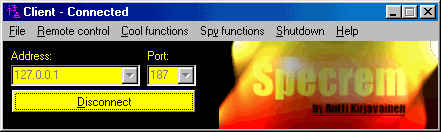
Informations
| Author | Antti Kirjavainen |
| Family | Specrem |
| Category | Remote Access |
| Version | Specrem 4.0 (a) |
| Released Date | May 2001, 25 years, 5 months ago. |
| Language | Visual Basic |
Additional Information
Server:
c:\WINDOWS\SYSTEM\SServer.exe

size: 536.576 bytes

port: 187 TCP

startup:
HKEY_LOCAL_MACHINE\Software\Microsoft\Windows\CurrentVersion\RunServices "SServer"

added:
c:\WINDOWS\SYSTEM\DIJPG.DLL
c:\WINDOWS\SYSTEM\KTKbdHk.dll
c:\WINDOWS\SYSTEM\MSSTDFMT.DLL
c:\WINDOWS\SYSTEM\scrrun.dll
c:\WINDOWS\SYSTEM\SServer.LOG

Server icon is visible in system tray
Author Information / Description
Specrem remote control Server & Client
	 by Antti Kirjavainen

Version: 4.00 Update #2

PROBLEMS?

Missing file or component...
You can download the required run-time files and components  from
my homepage. Here is the direct link for the needed file:

http://www.sunpoint.net/~akirjavainen/vbrun60.exe
After downloading this file, run it.


Component not registered...
Run SINSTALL.EXE, select "Install needed files" and press OK.


Some important security functions:
- If the server is invisible and it is connected through internet, it
  will popup the server window. Why? To prevent hacking. if you wan't to
  be able to connect to the server though internet, leave it visible,
  not invisible.
- If you wan't to use an invisible server in LAN, use the default port
  187. It won't popup the server window then.

These are my personal decisions to prevent hacking and wrong usage
with this program.

What to do, if someone has connected to your computer with this
program and you didn't even know about it, and/or you have the server
program running invisible, without your approval:

1. First, check the file SSERVER.LOG. It has logged every action
   that the users have done. It has also logged every IP address
   that has connected to your computer. If it contains something
   interesting, backup the file, because SERVUNST.EXE will remove
   it.
2. Run SERVUNST.EXE. If you don't have it, download Specrem from my
   homepage. This executable will kill the SSERVER.EXE process and
   removes it's all registry keys & files.
3. Contact me. It is important for me to know if something like this
   has happened. I'll then check what I can do about it.

Antti Kirjavainen
This archive is an almost-complete reconstruction of the legendary Mega Security (also known as Kobayashi), a premier 90s-era "Trojan Database" where malware authors once showcased their work. After a decade offline, the site was brought back in August 2024 by its original creator, MasterRat, who authorized me to host this modernized, searchable version of the collection. While the original site remains available for those seeking a nostalgic, old-school experience, we are proud to continue its legacy here. Full credit and thanks go to MasterRat and the retired Mega Security staff for their years of dedicated work in cataloging these historical samples.