 Archive A Reconstructed © MegaSecurity Database
SC-KeyLog 1.025
Released 24 years, 3 months ago. July 2002
Copyright © MegaSecurity
By Soft-Central
Informations
| Author | Soft-Central |
| Family | SC-KeyLog |
| Category | Information Stealer |
| Version | SC-KeyLog 1.025 |
| Released Date | Jul 2002, 24 years, 3 months ago. |
| Language | Visual C++ |
Author Information / Description
SC-KeyLog Version 1.025
Copyright © 2002 Soft-Central. All rights reserved.


TOC
------------------------------------------------------
	1.0 Description
	2.0 Usage
	2.1 General Settings
	2.2 Automailer
	2.3 Commandline options
	3.0 Software licence
	3.1 Disclamer
	4.o Contact
------------------------------------------------------


1.0 Description
------------------------------------------------------

SC-KeyLog logs all keyboard activity to a file.
Every single typed character and control button can
be logged. It can be used to monitor your productivity
or to spy on others.

SC-KeyLog can also log the names of the programs used
and the date and time of entered characters.

Average users won't notice SC-Keylog's presence.

------------------------------------------------------


2.0 Usage
------------------------------------------------------

Extract SC-KeyLog.zip  to a directory of your choice.
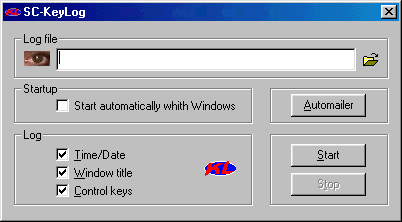
Start SC-Keylog.exe and specify a output file.
The file will be created if it doesn't exists.

Pressing the startbutton will hide SC-KeyLog's main
screen. Execute SC-KeyLog.exe again and hit the stop
button to stop logging.

------------------------------------------------------


2.1 General Settings
------------------------------------------------------

The supported settings are:

Log time/date      - Log the time and date

Log window title   - Log the name of the foreground
                     window to file.

Log control keys   - When activated function keys like
                     the tab,ctrl and arrowkeys will
                     be included in the logfile.

Start automatically  As soon as Windows boots SC-KeyLog
with Windows         will start logging keyboard activity
                     using the last known settings
                     whithout showing the main screen.

Note:
Start logging after you modified these settings to
store the settings for later use. In other words,
if you change a setting and close the program using the
cross at the topright of the screen or exit the program
using ALT-F4 (instead of hitting the start-button)
your changes will not be saved for later use.

------------------------------------------------------


2.2 Automailer
------------------------------------------------------

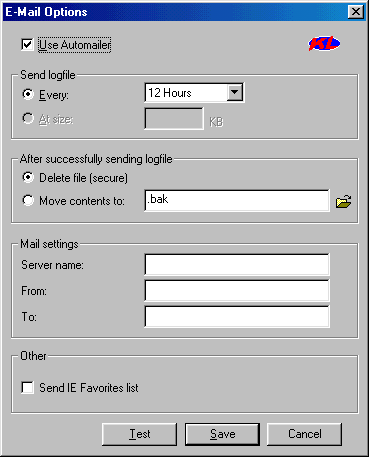
SC-KeyLog offers e-mail functionality for remote moni-
toring of a computer. Hit the button labeled 'Automailer'
on the main window to configure the e-mail settings.

The supported settings are:

Email every: Hour/Day   - Select the interval

At size:                - Not supported yet

Delete file		- After SC-KeyLog succeeds in
                          sending the logfile delete
                          the file permanently. None
                          of the undelete programs
                          available on the market will
                          succeed in recovering the
                          logfile.

Move contents to:       - Select this if you want to
                          save the logfile contents
                          after it has been e-mailed.
                          Specify a valid path to a
                          backup file. The logfile
                          contents will be appended to
                          the backup file and after that
                          the logfile will be deleted.

Server name:            - The name of the SMTP e-mail-
                          server for processing the e-mail.
                          This can be any server that
                          supports the 'from' and 'to'
                          e-mailaddresses.
                          Example: mail.yourISP.net

From:                   - The sender's e-mail address,
                          This can be any address (also
                          non-existing ones) as long as
                          it is in the form of
[email protected]
To:                     - Your e-mail address.

Send IE Favorites List	- E-Mail the present favorite
                          URL's of the logged on user

Test                    - Test the e-mailserver and
                          addresses by sending a test-
                          message. The logfile will
                          not be modified.

The program only attempts to send the logfile when the
computer is connected to the internet. Any occuring
errors are written to the logfile.

------------------------------------------------------


2.3 Commandline Options
------------------------------------------------------

It's possible to start logging without displaying the
main window of SC-KeyLog using commandline options.

The supported commandline options are:

SC-KeyLog.exe [-s][-f outputfile][-?]

  -s             start logging immediately without
                 showing dialog screens.
  -f outputfile  use file 'outputfile' for logging
                 if no outputfile is supplied SC-KeyLog
                 will use c:\SC-KeyLog.log as outputfile
  -a             enable 'start automatically with Windows'
                 option

  -?             show options

------------------------------------------------------
This archive is an almost-complete reconstruction of the legendary Mega Security (also known as Kobayashi), a premier 90s-era "Trojan Database" where malware authors once showcased their work. After a decade offline, the site was brought back in August 2024 by its original creator, MasterRat, who authorized me to host this modernized, searchable version of the collection. While the original site remains available for those seeking a nostalgic, old-school experience, we are proud to continue its legacy here. Full credit and thanks go to MasterRat and the retired Mega Security staff for their years of dedicated work in cataloging these historical samples.