 Archive A Reconstructed © MegaSecurity Database
Nuclear Rootkit
Released 20 years, 10 months ago. December 2005
Copyright © MegaSecurity
By Princeali
Informations
| Author | Princeali |
| Family | Nuclear Rootkit |
| Category | Remote Access |
| Version | Nuclear Rootkit |
| Released Date | Dec 2005, 20 years, 10 months ago. |
Additional Information
dropped files:
c:\WINDOWS\nkit.dll       Size: 44,544 bytes
c:\WINDOWS\Rootkit.exe    Size: 27,648 bytes

startup:
HKEY_LOCAL_MACHINE\SOFTWARE\Microsoft\Windows\CurrentVersion "shitbit"
data: SOFTWARE\Microsoft\Windows\CurrentVersion\Run

HKEY_LOCAL_MACHINE\SOFTWARE\Microsoft\Windows\CurrentVersion\Run "hello"
data: C:\WINDOWS\Rootkit.exe

tested on Windows XP
December 31, 2005
Author Information / Description
Nuclear Rootkit 1.0

Introduction
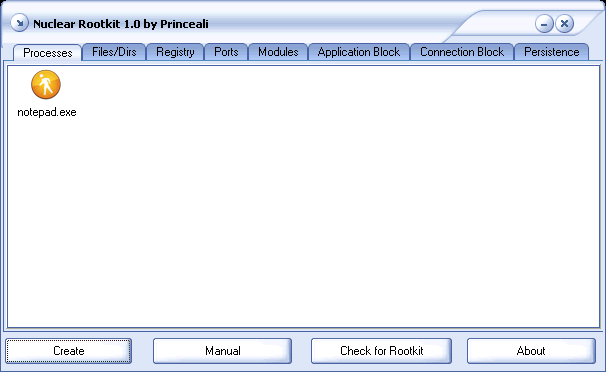
This rootkit perfom a user level Hook on Certain APIs , allowing you to Hide or modify some items on the NT Based OS (NT/2000/Xp/2k3) .

Features
*Process Hiding
*Files / Dirs Hiding
*Registry keys Hiding
*Connection in Netstat hiding
*Modules (dll) Hiding
*Application Block
*Connection Block
*Persistence (Undeletable , Unrenamable , Unmovable)

Usage
* Add the Files Names / Reg keys / Ports ect ... to the list in the Section you want and Click the Create Button.
* To Check if The Rootkit is Already Running on you , Click Check Result .
*You Can Save / load your Settings any time using Load Script / Save Script in the Context menu , I included a sample script called
samplescript.nsf you can load it directly in the rootkit editor .

Benefits / Hints

Process
Hide Process(s) totally from the task manager.

Hint : Add Exact processes name for example (notepad.exe)

File/Dir
Hide Directory(s) or File(s) from windows explorer.

Hint : Add Exact File or Directory Name for example (notepad.exe � Ali)

Registry
Hide Registry Value(s) from the registry editor and MSConfig.

Hint : Add Exact Registry Strings for example (hello)


Ports
Hide connections on / though any port(s) in netstat.

Hint : Add Ports and Protocols , for example (80 � http � smtp � 25 ect�)


Modules
Hide Modules in specific processes from any module explorer.

Hint : Add the Process Name then the module name , please note that
       Some firewalls might block network access to the process u
       Have chosen to hide a module in it .

Application Block
Block explorer from executing a list of applications

Hint : Add Exact file name for example (file.exe)


Connection Block
Block applications from connecting to anything

Hint : Add Exact processes name for example (iexplore.exe)


Persistence
Protect Directory(s) or File(s) from being deleted / renamed / moved

Hint : Add Exact processes name for example (notepad.exe , Directory ,ect�)


Credits
afxcodehook - aphex
peb  - erazer

Princeali
This archive is an almost-complete reconstruction of the legendary Mega Security (also known as Kobayashi), a premier 90s-era "Trojan Database" where malware authors once showcased their work. After a decade offline, the site was brought back in August 2024 by its original creator, MasterRat, who authorized me to host this modernized, searchable version of the collection. While the original site remains available for those seeking a nostalgic, old-school experience, we are proud to continue its legacy here. Full credit and thanks go to MasterRat and the retired Mega Security staff for their years of dedicated work in cataloging these historical samples.