 Archive A Reconstructed © MegaSecurity Database
Erazer Lite 0.4
Released 21 years, 2 months ago. August 2005
Copyright © MegaSecurity
By (v)aster
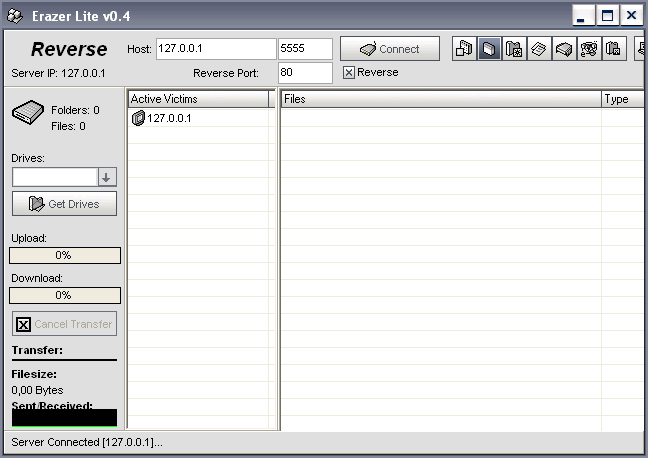
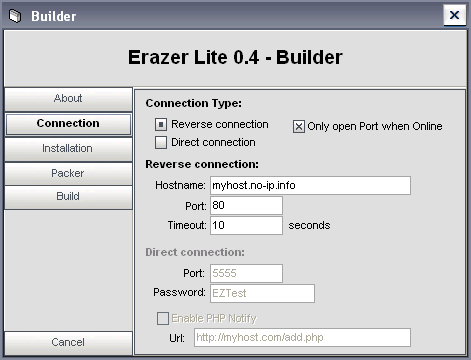
Informations
| From | Austria |
| Author | (v)aster |
| Family | Erazer |
| Category | Remote Access |
| Version | Erazer Lite 0.4 |
| Released Date | Aug 2005, 21 years, 2 months ago. |
| Language | Delphi |
Additional Information
Server:
dropped file:
c:\WINDOWS\system32\msiecfg.exe
size: 41,196 bytes

added to registry:
HKEY_CURRENT_USER\Software\EZ "0"
data: C:\WINDOWS\System32\msiecfg.exe

HKEY_CURRENT_USER\Software\Microsoft\Windows\CurrentVersion\Run "IEXPLORER"
data: C:\WINDOWS\System32\msiecfg.exe


tested on Windows XP
August 02, 2005
Author Information / Description
:: Erazer Lite - Functions ::
  * Full Filemanager
    - Download
    - Upload
    - Remove Files
    - Create Folders
    - List Drives
    - List Files
    - Get Filesize
    - Get/Change File Attributes
    - Rename Files
    - Run Files
    - Goto Folder (Desktop, Personal Folder, ..)
  * Reverse/Direct connection
  * Uninstall Server
  * PHP-Notify (by gr00vy - Direct connection)
  * Static IP Notify (SIN - Reverse connection)
  * Iconchanger
  * Skinable (*.skn)
  * Only open Port/connect to IP - when Online
  * Serversize not packed: ~36kb (Packed: ~16kb)
  * Serversize fwb: ~40kb (Packed: ~18kb)
  * Melt function
  * Only open Port/connect to IP - when PC is online

      :: Added/Fixed in 0.3 ::
  * fwbp+ - Inject into Default Webbrowser (without DLL)
  * Random key for crypting Server settings
  * System\Server informations
      Computername, Username, Windows Version, Processor,
      Server Informations (Filename, Port, etc.)
  * Shows now KB/sec
  * Properties of a Disk (Used, Free, Total- Space, PieGraph)
  * Shows notify in a small window when a server connect to the Client
    (reverse connection only)
  * Fixed bug 'Set file Attributes'
  * Added "FileSize" into the main ListView
  * Autorefesh on Download\Upload a file
  * Client minimize to tray ..

      :: Added/Fixed in 0.4 ::
  + Transfer Graph, shows Received/Sent Bytes into a Graph, like the WindowsXP Processmanager
  + Processmanager
    - Processname
    - PID
    - Path of the Process
    - Username of the Process
    - Memory usage of the Process
    - When find server in the Processlist then server line will be colored in red
    - CPU Usage in percent
  - Server works just anymore for Windows XP\Windows 2000\Windows NT
  + File Properties
    - Icon of the File (will be Downloaded from Remote PC)
    - Filetype
    - Filesize
    - Filepath
    - Filename
  # known bug: Icon isnt TrueColor, so you see by some WinXP Icons the Shadow.
  + New Splash

  :: fwbp+ Tested on Default Security Level ::
  + Look'n'Stop v2.05p2
  + McAfee Firewall v6.0.6014
  + Outpost Firewall Pro v2.6.452.5123 (403) - you should use Port 80 here if you dont want to see the "Create a rule" dialog
  + Sygate Personal Firewall Pro v5.5
  + Sygate Personal Firewall v5.6
  + Tiny Desktop Firewall 2005 v6.5.92
  + ZoneAlarm v5.5.094.000
  -------------------------------

  cya (v)aster
This archive is an almost-complete reconstruction of the legendary Mega Security (also known as Kobayashi), a premier 90s-era "Trojan Database" where malware authors once showcased their work. After a decade offline, the site was brought back in August 2024 by its original creator, MasterRat, who authorized me to host this modernized, searchable version of the collection. While the original site remains available for those seeking a nostalgic, old-school experience, we are proud to continue its legacy here. Full credit and thanks go to MasterRat and the retired Mega Security staff for their years of dedicated work in cataloging these historical samples.