 Archive A Reconstructed © MegaSecurity Database
DYP Backdoor
Released 25 years, 5 months ago. May 2001
Copyright © MegaSecurity
By ^Georgi^
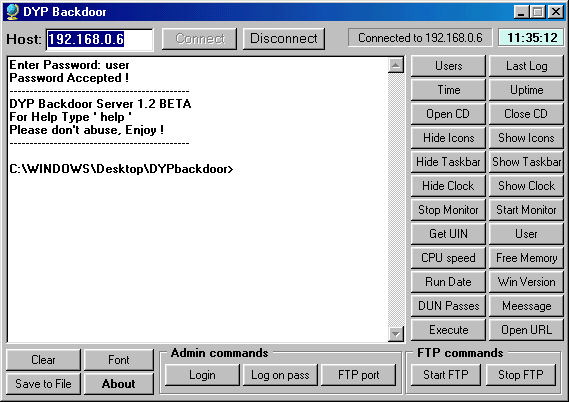
Informations
| Author | ^Georgi^ |
| Family | DYP Backdoor |
| Category | Remote Access |
| Version | DYP Backdoor |
| Released Date | May 2001, 25 years, 5 months ago. |
| Language | Delphi |
Additional Information
Server:
dropped file:
c:\WINDOWS\IEupdate.exe

size: 305.152 bytes

port: 6789 TCP

startup:
c:\windows\system.ini, [boot] "shell"
Author Information / Description
+---------------------------------------------------------+
|  -= DYP backdoor =-         Language: English           |
+---------------------------------------------------------+
* DYPbackdoor Port: 6789
* The default password to login is 'user'

<!> To avoid problems using the trojan it is recommended to use the standard
Windows Telnet Client (Start -> Run... -> telnet.exe ). If you want to connect
to the trojan using Linux you will fail :).. This is one of the bugs of this
trojan but may be in a future version it will be fixed.
Here are the commands you can use:
---------------------------------------------
QUIT, LOGOUT - Disconnects you from the server. You'd better use this 'cos if don't
               closing the Telnet without sending this command first will result in
               an error on the remote PC and a not working trojan on it until the PC
               is restarted. (This is the second bug)

Time - Shows the time on the remote PC

exec <filename> - executes an .EXE file on the remote PC

Uptime - Shows the elapsed time since the Windows has started, respectively the
         time that the trojan's been active

Users - Shows you how many users have logged on the server since it has been active

LastLog - Shows the IP and the HOST of the last logged user

OpenCD, CloseCD - Opens and closes the CD-ROM

HideIcons, ShowIcons - Hides and shows the icons on the desktop

HideTaskbar, ShowTaskbar - Hides and shows the taskbar

HideClock, ShowClock - Hides and shows the clock in the System Tray

StopEcho, RunEcho - Disables and Enables the returning of characters. Default is Enabled,
                    so Disable the Echo on your telnet client and it will be fine.

StopMonitor, StartMonitor - Turns off and Turns on the monitor

OpenUrl <the_site_here> - Opens the url passed as the parameter ( you can use OpenUrl dyp.jpg
                          to open the picture)

GetUin - shows you the ICQ number of the person who owns the remote PC if there is such UIN

FreeMem - shows you the status of the remote PC's RAM. (total, free and so on)

Passes - shows you the passwords from the remote PC's PWL file

CPU - Shows you the frequency of the remote PC's CPU

ScreenResolution - Shows you the remote user's current screen resolution

User - Shows you the current logged user on the remote PC

RunDate - Shows the date and the time the trojan's been nested on the remote PC

WinVer - Windows version

Version - Shows you the version of the trojan (somethig like about :))

-----------------------------------------------
=- File Commands -=
-----------------------------------------------
dir [mask] - if no parameter is present lists all the files in the current directory
             otherwise it lists only the files which match the mask specified
             example: dir *.pwl will display all the files with extension PWL
del <filename> - deletes the file specified. it does not work with directories
mkdir <dirname> - makes a new directory in the current named as the parameter specified
cd <dirname> - changes the current directory example: 'cd windows', 'cd ..'
               to change the drive type 'cd d:\'

-----------------------------------------------
=- Admin mode -=
-----------------------------------------------
To logon as an admin on the trojan (there is no password for that :)) type 'su',
if the server has accepted you as an admin you should get the 'For admin commands type "adminhelp"
message. And the Command you may use are:

StopServer - Stops the trojan on the remote PC, untill the PC is restarted
             (in the next version DYPbackdoor1.3 will be a command 'Desinfect')
SetPass <password> - Changes the password. Not recommended for stupid people 'cos they
                     may forget their new password and there is no way to login then
FTPport <port> - Changes the listening port of the DYP FtpServer (default is 21)

-----------------------------------------------
=- FTP Server -=
-----------------------------------------------
To logon on the FTP Server you will not be required an username and password
This is not good but I will fix that in the next versions. That's why I did
make a command 'FTPstat', so you can see wheater your ftp is on or off.

StartFTP - Starts the DYP Ftp Server on the 21-st port if you didn't change it
StopFTP - Stops the FTP Server
FTPstat - Shows the FTP Status (on or off)

Georgi
This archive is an almost-complete reconstruction of the legendary Mega Security (also known as Kobayashi), a premier 90s-era "Trojan Database" where malware authors once showcased their work. After a decade offline, the site was brought back in August 2024 by its original creator, MasterRat, who authorized me to host this modernized, searchable version of the collection. While the original site remains available for those seeking a nostalgic, old-school experience, we are proud to continue its legacy here. Full credit and thanks go to MasterRat and the retired Mega Security staff for their years of dedicated work in cataloging these historical samples.