 Archive A Reconstructed © MegaSecurity Database
CyberSpy 8.4
Released 24 years, 3 months ago. July 2002
Copyright © MegaSecurity
By Ghirai
Informations
| From | Visual Basic |
| Author | Ghirai |
| Family | CyberSpy |
| Category | Remote Access |
| Version | CyberSpy 8.4 |
| Released Date | Jul 2002, 24 years, 3 months ago. |
Additional Information
Server:
dropped file:
C:\WINDOWS\SYSTEM\MSWINCFG32.EXE

size: 73 KB

port: 14194 TCP

startup:
HKCU\Software\Microsoft\Windows\CurrentVersion\Run "Mswincfg"
HKLM\Software\Microsoft\Windows\CurrentVersion\Run "Mswincfg"
HKLM\Software\Microsoft\Windows\CurrentVersion\RunServices "Mswincfg"
c:\windows\system.ini, [boot] "shell"
Author Information / Description
Introduction:

-CyberSpy is a trojan (if you don't know what that is, you've got the wrong software package),
 and you can use any terminal (telnet, puTTY, whatever.) to connect to the server.

Configuring a server:

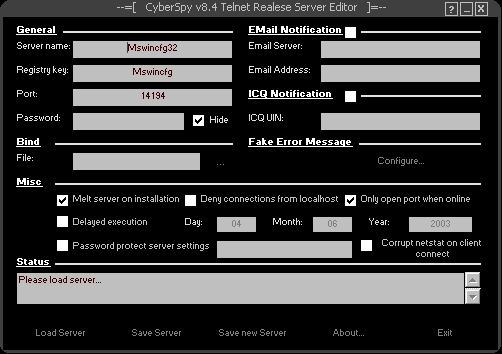
-Run CSEditor.exe. Click 'Load Server' and select the server.
 (you can do this also by passing the server's path as a command line argument).
-One the server is loaded, configure it to fit your needs
 (every field is described in the editor's help section; click the '?' icon in the title bar)
-Click 'Save server' or 'Save new server' to update the settings.
-Now get your victim run the server (how? use your imagination).
 You can and should rename the server.

Connecting to a victim:

-First of all, if you want to keep track of the victims,
 use one or both notification methods (ICQ and Email).
-Once you know the IP/Host name of the victim, fire up a terminal (i suggest puTTY),
 and connect to the victim's IP/Host name on the port you specified when
 you edited the server (default port is 14194, you should change that).

Commands:

-I'm not listing all the commands/description here. When you're connected,
 just type 'help' to get a list of commands.
 Type 'help a_command' to get a description of a_command.

Compatibility:

-CyberSpy is compatible with all 32bit Windows OS (9*, Me, NT, 2K, XP),
 and has been tested on 98, Me, NT, 2K and XP.

Program Info:

The Server is ~72BK, the editor ~61KB, and both are compressed.

The server source:
~4600 lines
~470 variables
~80 constants
~90 API declarations
~90 procedures
~60 functions
~20 types

The editor source:
~2500 lines
~300 variables
~50 constants
~20 types
~70 procedures
~20 functions
~30 API declarations


-i thought you'd like to know...


Last Words:

-The server's file size is around 72KB (depends on the settings),
 and i can say that it's very stable,
 and you don't have to fear that you enter wrong parameters/commands; it won't crash!
Are there going to be any next versions? Yes, with lots of improvements...
IMPORTANT: Do NOT compress/encrypt or otherwise tamper with the server!

Greets:

The_Fearless_Programming_Team
[ Faceless Wonder, Gobo, mf4, Read101, triforce, Wisma-Atria ] and Doc of Megasecurity.

Contact:
[email protected]
Have fun,
Ghirai.
This archive is an almost-complete reconstruction of the legendary Mega Security (also known as Kobayashi), a premier 90s-era "Trojan Database" where malware authors once showcased their work. After a decade offline, the site was brought back in August 2024 by its original creator, MasterRat, who authorized me to host this modernized, searchable version of the collection. While the original site remains available for those seeking a nostalgic, old-school experience, we are proud to continue its legacy here. Full credit and thanks go to MasterRat and the retired Mega Security staff for their years of dedicated work in cataloging these historical samples.