 Archive A Reconstructed © MegaSecurity Database
CoolCat
Released 25 years, 7 months ago. March 2001
Copyright © MegaSecurity
By Luis Cobian
Informations
| Author | Luis Cobian |
| Family | CoolCat |
| Category | Remote Access |
| Version | CoolCat |
| Released Date | Mar 2001, 25 years, 7 months ago. |
| Language | Delphi |
Additional Information
Server:
Port: 1969 TCP

Startup:
HKLM\Software\Microsoft\Windows\CurrentVersion\Run
Author Information / Description
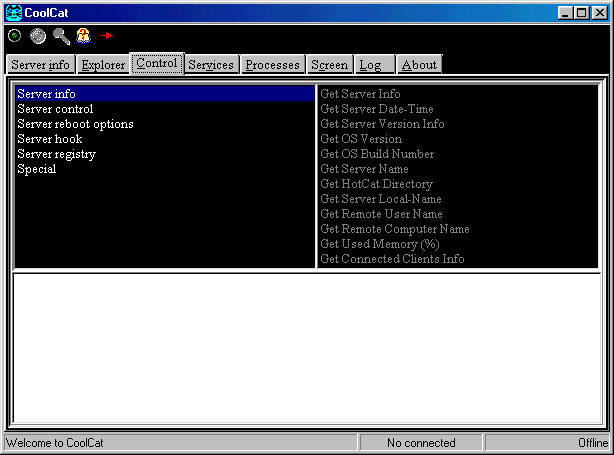
Functions supported by HotCat/CoolCat

* All Shell Operations (Copy, move delete, rename files and directories)
* Visual remote explorer
* Download and upload files to the server
* Get files' and directories' properties (size, attributes)
* Control recycle bin
* Send messages, play sounds, start programs
* Reboot or shut down windows. You can even re-start HotCat.
* See the keyboard events in the server (hook)
* View registry keys, create or delete registry keys or values
* View, start and stop services (if HotCat is running on NT or 2000)
* View and kill processes running on the server machine.
* Get screen dumps from the server machine... and more

HotCat configuration

Options:
Select the options and click Apply.
Autostart: Starts HotCat automatically with Windows.
Autolisten: start listening to connections when HotCat starts.
Protect vital files: deny access to the configuration and log files from the client.
Log errors only: to reduce the size of the log file, you can log only errors.
Port: TCP/IP port (default: 1969).
Beep on connect: when a client connects, the server will beep.
Permit shutdown: if selected, you can shutdown or restart Windows from the client.
Password: if this is the first time you use HotCat,
the default password is "cats" (without quotes).
You can change the password from the client or the server.
Permit only one connection: only one connection is permitted at  the same time.
Command line/Send and view: test custom commands (see help).
Security: Allow or deny connections from some IPs.


Known problems

Sometimes, when the client is waiting for a response, and you send another command,
the client will crash.  Disconnect and connect again.

The client may crash when sending or receiving big files.
You cannot send-receive directories.
HotCat/CoolCat is NOT and is not intended to be a FTP application.
If you are sending/receiving a file,
be patient and don't send another command while the transfer is alive.

 In NT or Windows 2000, the logged user's rights and permissions may limit HotCat.
This archive is an almost-complete reconstruction of the legendary Mega Security (also known as Kobayashi), a premier 90s-era "Trojan Database" where malware authors once showcased their work. After a decade offline, the site was brought back in August 2024 by its original creator, MasterRat, who authorized me to host this modernized, searchable version of the collection. While the original site remains available for those seeking a nostalgic, old-school experience, we are proud to continue its legacy here. Full credit and thanks go to MasterRat and the retired Mega Security staff for their years of dedicated work in cataloging these historical samples.