 Archive A Reconstructed © MegaSecurity Database
B-|R.A.T|-T
Copyright © MegaSecurity
By BrosTeam
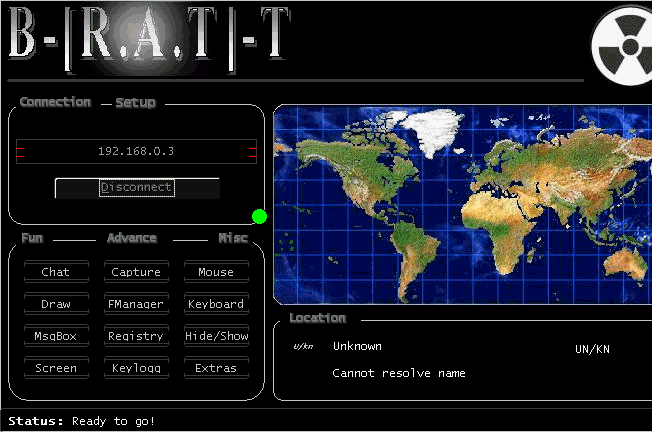
Informations
| Author | BrosTeam |
| Family | B-|R.A.T|-T |
| Category | Remote Access |
| Version | B-|R.A.T|-T |
| Language | Visual Basic |
Additional Information
Server:
dropped files:
c:\TEMP12345678.exe            Size: 1,105,920 bytes
%local dir%\dsfiles.dll        Size: 8,244 bytes
c:\WINDOWS\sdssdgjeg012.exe    Size: 1,105,920 bytes

port: 4123 TCP

startup:
HKEY_LOCAL_MACHINE\SOFTWARE\Microsoft\Windows\CurrentVersion\Run "NortonLiveUpdate2o"
data: C:\windows\sdssdgjeg012.exe

HKEY_LOCAL_MACHINE\SOFTWARE\Microsoft\Windows\CurrentVersion\RunOnce "afkasjhfa3254f"
data: C:\TEMP12345678.exe


tested on Windows XP
June 06, 2005
Author Information / Description
CLIENT: B-[R.A.T]-T.exe
SERVER: WMUpdate.exe


---------------------------------

Infection:
           Simple
           Suggested to use with 00003.exe and/or IRC-Zombie
              00003 will disable any AVs/Firewalls
              IRC-Zombie will notify u when the user is online.
           Use MBinder to bind them together.

Ports:
       4123
       4124
       4125
       4126
       4127

Scan for 4123 to find such users.

Password:
          In Setup Menu u can set/remove pass.
          If server its password protected, it 'll
          require pass to allow u to connect to it.
          If there is no pass set yet, server 'll
          allow u to connect.
          To reset /remove a pass, just leave the
          password field empty and press "Set".

Menus:
       Most labels on main screen controls menus.
       ex. "Setup" , "Fun", "Advance", "Misc"

       "Screen" and "Capture" have sub-menus.

Options:
         FUN:
              1.0) Chat
              2.0) Draw
              3.0) MsgBox
              4.0) Screen:
                     4.1) Animations
                     4.2) ScrSaver
         ADV:
              1.0) Capture
                     1.1) Desktop
                     1.2) WebCam
              2.0) FManager
              3.0) Registry
              4.0) Keylogger
         Misc:
              1.0) Mouse
              2.0) Keyboard
              3.0) Hide/Show
              4.0) Extras

Advance remote tracing
Server Setup

NOTE: "Capture Desktop": Allows u to view and control remote PC.
                         The speed depends on both PCs.
      "Capture WebCam": If a webcam its unplugged or not installed
                        u may get any wrong image or to get error.
      "Animations": Matrix maybe kill connection with server.


BrosTeam
This archive is an almost-complete reconstruction of the legendary Mega Security (also known as Kobayashi), a premier 90s-era "Trojan Database" where malware authors once showcased their work. After a decade offline, the site was brought back in August 2024 by its original creator, MasterRat, who authorized me to host this modernized, searchable version of the collection. While the original site remains available for those seeking a nostalgic, old-school experience, we are proud to continue its legacy here. Full credit and thanks go to MasterRat and the retired Mega Security staff for their years of dedicated work in cataloging these historical samples.