 Archive A Reconstructed © MegaSecurity Database
ACiD Shivers (a)
Released 27 years, 11 months ago. November 1998
Copyright © MegaSecurity
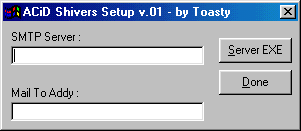
Informations
| Family | AcidShivers |
| Category | Remote Access |
| Version | ACiD Shivers (a) |
| Released Date | Nov 1998, 27 years, 11 months ago. |
| Language | Visual Basic |
Additional Information
Server:
C:\WINDOWS\MSGSVR16.EXE

size: 186.368 bytes

port: random

startup:
HKLM\Software\Microsoft\Windows\CurrentVersion\Run
HKLM\Software\Microsoft\Windows\CurrentVersion\RunServices
Author Information / Description
This is a list of the commands implemented so far :

Help (Command)		- Lists most of the commands (description of command)
HIDE <PID>		- Hide a task from control + alt + delete
SHOWs <PID> 		- Show a hidden task in control + alt + delete
DIR			- List Contents of Current Directory
LS		        - List Contents of Current Directory
CD <dir> 		- Change To Specified Directory/Drive
CLS 			- Clear Screen
KILL 			- Kill Process by PID (Shown in PS)
PS 			- Shows Running Processes
DEL <file>  		- Deletes Specified Files
PORT <#> 		- Change Port Acid Shiver Listens on (Until Next Reboot)
DESK 			- Change to default Windows Desktop folder
RECENT 			- Change to Windows Recent folder
WSFTP 			- Change to default WS_FTP folder
VERSION			- Show Version Number of Acid Shiver
DRIVES 			- Show physical, RAM, CD-ROM, and Network drives
BOUNCE <host> <port> 	- Relay connection to host on port, Control + C to abort
S			- Sendkeys to active window
MACADDR 		- Show ethernet stats and physical address
NAME <name> 		- Rename the users computer
ENV 			- Shows DOS Environment variables
BEEP <#> 		- Beeps the specified number of times
CDROM 			- Type 'CDROM' for more information
DIE 			- Terminate Acid Shiver
LABEL <Drive> 		- Rename a specified disk drive
SHUTDOWN 		- Type 'Shutdown' for more information
DRIVE <Drive> 		- Retrives information on specified drive
KS <Socket #> 		- Disconnect a session by socket index show in 'STATUS'
TIME 			- Shows users current system time
DATE 			- Shows users current system date
INFO 			- Shows some general system information about host and user
STATUS 			- Show the state of all sockets used since last reboot
CAT <filename> 		- Retrieve specified file
GET <filename> 		- Retrieve specified file
BCAT <filename> 	- Retrieve specified file in hex form
BGET <filename>		- Retrieve specified file in hex form
CMD <Shell Command> 	- Run the specified shell command
SH <command> 		- Run the specified command and display results (may lock up)
MKDIR <path>		- Make a new directory
RMDIR <path> 		- Remove a directory and all files and subdirectories inside
COPY <file1> <file2> 	- copy file1 to file2

Toasty
This archive is an almost-complete reconstruction of the legendary Mega Security (also known as Kobayashi), a premier 90s-era "Trojan Database" where malware authors once showcased their work. After a decade offline, the site was brought back in August 2024 by its original creator, MasterRat, who authorized me to host this modernized, searchable version of the collection. While the original site remains available for those seeking a nostalgic, old-school experience, we are proud to continue its legacy here. Full credit and thanks go to MasterRat and the retired Mega Security staff for their years of dedicated work in cataloging these historical samples.